Call us now!

Colour Management in Virtual Production: A Practical ACES Workflow Guide

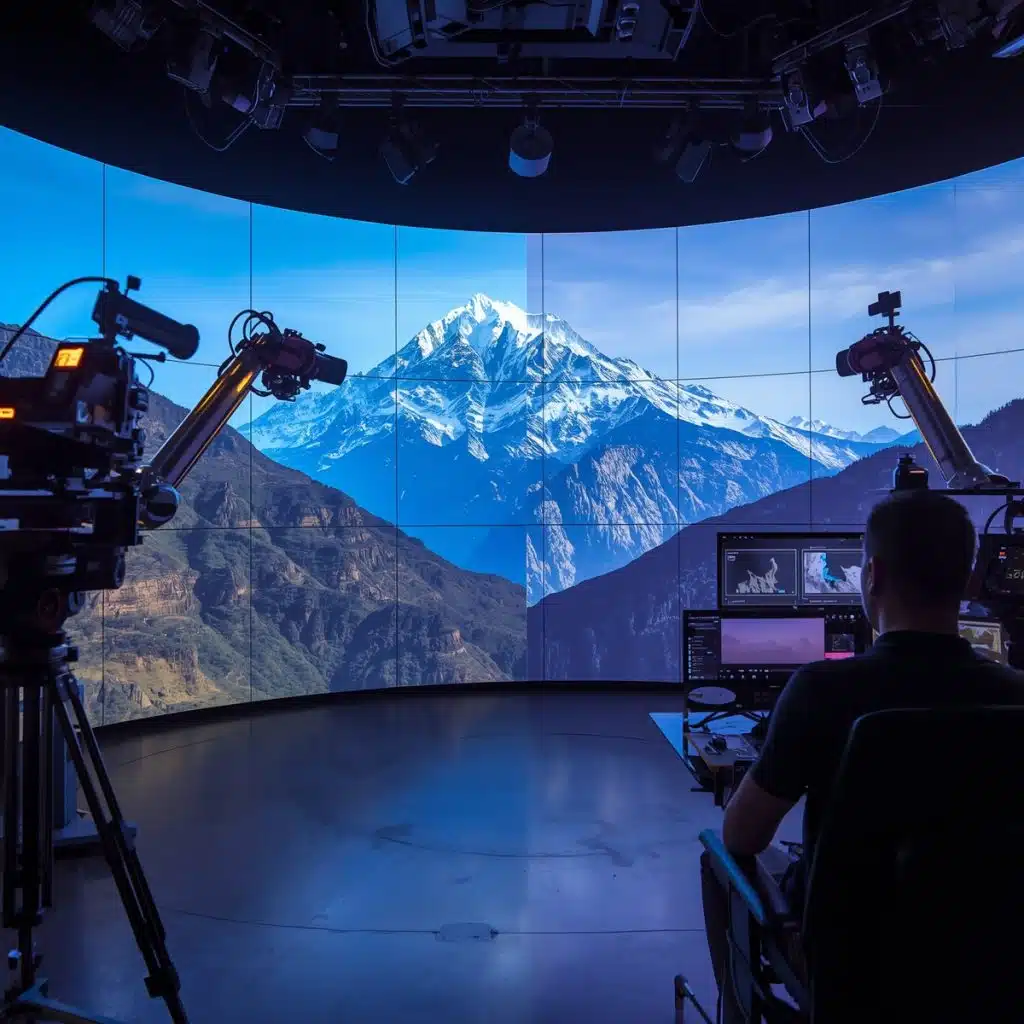
Colour shapes emotion, mood, and meaning and in virtual production, it also solves chaos. LED volumes, real-time engines, cinema cameras, and post-production all bring their own colour quirks. Without a unified system, you get mismatched tones, drifting LED walls, unpredictable skin colour, and painful fixes in post.

ACES- the Academy Colour Encoding System is the industry’s answer. It gives every device, display, camera, and engine a single colour language to speak.


This guide breaks down exactly how ACES works in virtual production, how it integrates with LED stages, and how to build a clean colour pipeline end-to-end.

CONNECT WITH US

Please enter your name
Please enter your mobile number
Please enter your email Id
The Virtual Production Academy
9th Floor, Suvidha Square,
Ceaser Road, Amboli,
Andheri (W), Mumbai - 400 058

Why Colour Management Matters in Virtual Production

Virtual production brings together multiple colour spaces:
  • LED panels (RGB diodes)
  • Unreal Engine render output
  • Camera sensors (with proprietary colour science)
  • Monitoring systems
  • Post-production delivery standards
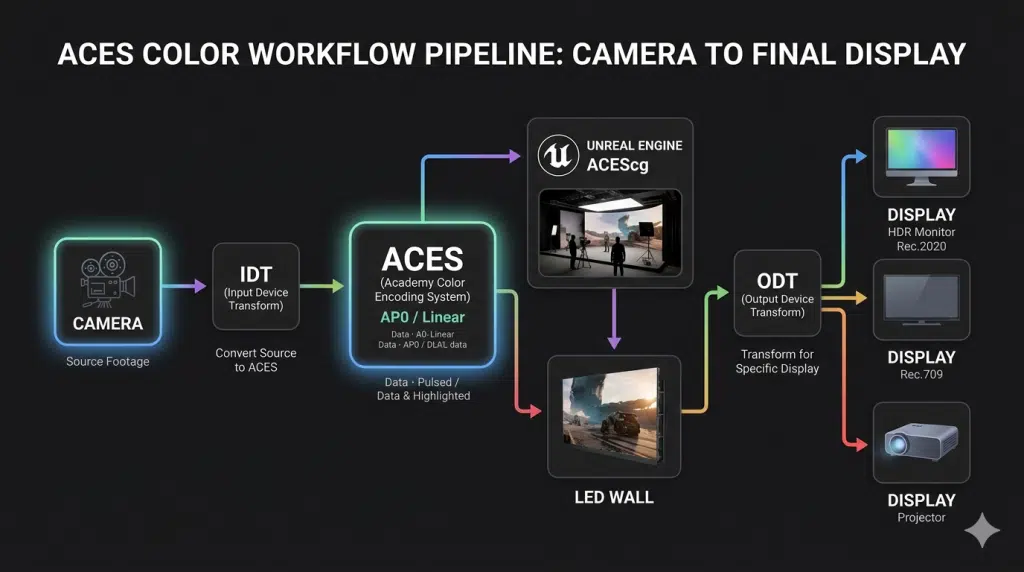
If each uses a different colour space or gamma, the result is chaos. ACES fixes this by turning the entire workflow into a single, standardized colour pipeline Ref.

What ACES Actually is Simplified?

ACES is:

  • Scene-referred (captures how light exists in the real world)
  • High dynamic range (HDR)
  • Wide-gamut (bigger colour volume than Rec.2020)

ACES workflow steps:

  • Cameras → IDT → ACES
  • Unreal Engine → ACEScg
  • LED wall → displays ACES-managed output
  • On-set monitor → ODT (Rec.709, P3, HDR)
  • Post → ACEScct grading
  • Delivery → ODT to final format

It keeps colour consistent from LED volume to final master.

Step-by-Step ACES Workflow for Virtual Production

1. Calibrate LED Volumes Properly

LED walls must be treated like precision lighting instruments, not just big shiny screens.

Use professional LED processors such as:

Brompton Tessera for industry-leading colour accuracy, ShutterSync, and HDR workflows

Megapixel VR Helios for wide-gamut performance, ACES support, and per-pixel calibration

NovaStar Processors widely used in LED volume setups for reliable colour management, brightness control, and precise calibration across large-scale panels

These processors help you accurately match:

  • White point
  • Gamma
  • Brightness
  • Colour gamut

When you’re working in ACES, consistency isn’t optional- it’s the whole game.

One weak link in calibration, and the illusion breaks faster than a bad green screen key.


2. Set Up ACES Properly Inside Unreal Engine

Unreal Engine has native ACES tone-mapping and ACEScg support.

Follow the Guides UE Colour Management and UE Working Colour Space Guide.

Checklist:

  • Enable ACES Filmic Tonemapper
  • All textures imported as linear/ACEScg (not sRGB unless necessary)
  • Use HDR EXR environments
  • Avoid double tone-mapping
  • Set proper exposure and luminance levels for LED walls

This ensures wall content matches camera-captured footage.


3. Apply Camera IDTs (Input Device Transforms)

Each cinema camera needs the correct IDT:

  • Arri → IDT.Alexa
  • Sony Venice → IDT.SonyVenice
  • RED → IPP2 + ACES IDT
  • Blackmagic → IDT.BMDFilm

IDTs ensure all camera footage enters ACES consistently.


4. Ensure LED Wall Output Matches ACES

UE sends ACEScg → LED Processor → LED panels.

Guidelines:

  • LED processors must avoid adding hidden LUTs
  • Wall brightness must stay within HDR-safe limits
  • Content must be linear or ACEScg, not Rec.709
  • Use correct ODT for the LED display’s gamut (P3, Rec.2020)

This ensures lighting and reflections on actors look natural.


5. Use LUTs Carefully

LUT misuse is one of the fastest ways to break colour.

Rules:

  • Never load creative LUTs onto LED walls
  • Apply LUTs only on monitors, not in content playback
  • Use ACES-compliant LUTs for on-set looks

ACES LUTs preserve consistent contrast curves from real to virtual.


6. Monitor Through Correct ODTs

On-set monitors require ACES Output Device Transforms:

  • ACES → Rec.709
  • ACES → P3
  • ACES → Rec.2020 (HDR)

This ensures every department sees the same colours.


7. Continue the ACES Pipeline in Post

Post workflow:

  • Import raw camera files
  • Apply ACES IDTs
  • Grade in ACEScct
  • Output through ODT to final deliverables

Post-production becomes clean, consistent, and future-proof.


Why ACES Is Essential for Virtual Production

Perfect colour match across:

  • LED walls
  • Practical lights
  • Camera sensors
  • Unreal Engine

Accurate skin tones under LED lighting
ACES preserves subtle hues even under RGB-heavy LED illumination.

Post-production consistency
No unexpected colour shifts.

Future-ready
You can remaster for HDR or future formats without rebuilding your grade.

Common Mistakes to Avoid

  • Using sRGB textures inside Unreal Engine
  • Leaving LED walls uncalibrated
  • Applying LUTs on the wall
  • Double tone-mapping
  • Mismatching ODTs and monitors
  • Ignoring camera IDTs
  • Mixing Rec.709 and ACEScg textures
  • Avoid these and 90% of colour problems disappear.

Conclusion

Colour isn’t just a technical detail in virtual production- it’s the glue that binds the physical and digital worlds into one believable frame. ACES brings order to this complexity. By giving cameras, LED walls, Unreal Engine, monitors, and post-production a universal language to speak, it ensures consistency, accuracy, and creative freedom at every stage of the pipeline.

When LED volumes and real-time environments are rendered through a stable ACES framework, skin tones stay true, environments feel cohesive, and the cinematographer’s intent survives all the way to the final master. For studios investing in high-end virtual production, adopting ACES isn’t just a recommendation, it’s the foundation of a reliable, future-proof workflow.

Mastering colour management is mastering immersion. With ACES as the compass, your virtual worlds not only look good- they feel real, they age well, and they give creators the confidence to push the boundaries of storytelling.

At TVPA, we guide creators in mastering ACES so every project they build carries the precision, consistency, and cinematic truth that world-class virtual production demands.

RECENT POSTS

Colour Management in Virtual Production: A Practical ACES Workflow Guide

Virtual Production has often been portrayed as a playground for

Scalability of Virtual Production for Indie Filmmakers

Virtual Production has often been portrayed as a playground for

How In-Camera VFX (ICVFX) Works: The Future of Visual Storytelling

Filmmaking is undergoing a profound transformation. Gone are the days

The Rise of Virtual Sets, Smart Cameras and New Direction Trend in India

Content creation in India is undergoing a radical transformation. No

Is the Green Screen Era Finally Over?

For over a century, filmmakers have pushed the boundaries of

Catching Up with Global Trends of Virtual Production in Bollywood

The world of cinema is no longer confined to physical